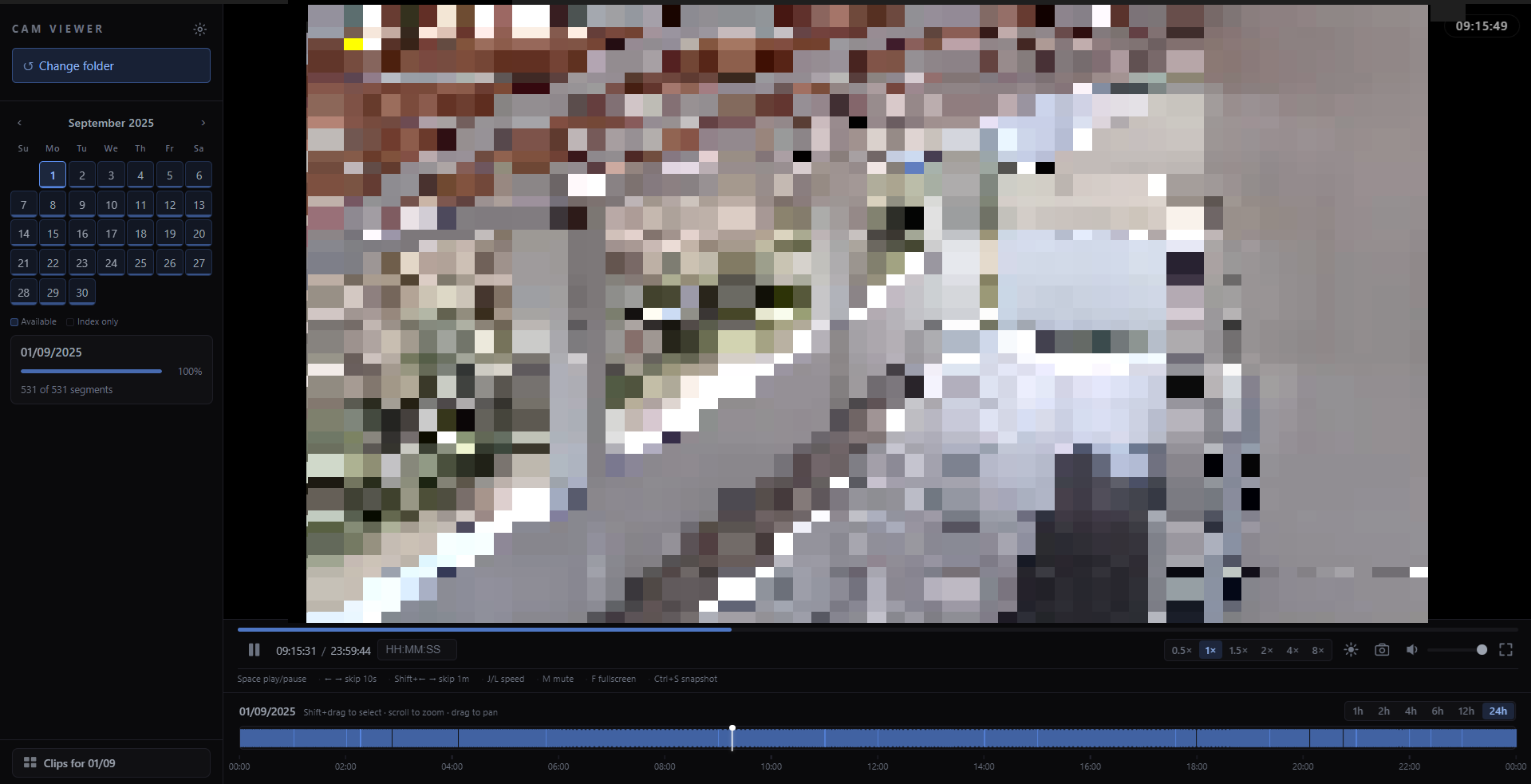
I Built a Desktop App to Watch My Own Security Camera Footage

How I reverse-engineered the Godrej Ace Pro camera format and built a free, open-source Electron app to browse, play, and export footage on my own terms.
I Built a Desktop App to Watch My Own Security Camera Footage
There's something quietly frustrating about owning a security camera system and not being able to easily review the footage on your own terms. This is the story of how that frustration pushed me to build Cam Video Viewer — a free, open-source Electron desktop app for browsing, playing back, and exporting footage from Godrej Ace Pro camera systems.

The Problem
We have a Godrej Ace Pro DVR system at home. It records continuously across multiple channels, stores everything locally on a hard drive, and gives you a mobile app and a web interface to view footage.
The mobile app works fine for checking live feeds. But whenever I needed to go back and actually review footage — find a specific clip from last Tuesday, export a 30-second segment, or just browse what was recorded on a particular day — it became a painful experience.
The official software is clunky. The web interface is slow. There's no easy way to scrub through a timeline, jump to a specific time, or export a clip without going through a multi-step process that feels like it was designed in 2005.
The footage itself is stored on a local drive attached to the DVR. I could physically access those files. I just couldn't do anything useful with them — because the files are in a proprietary format with no documentation, no third-party support, and no decent tooling.
So I decided to reverse-engineer the format and build something better.
Figuring Out the Format
The recordings live in a folder structure that looks like this:
root/
  index/          ← binary index files, one per day
  video/
    <channel>/
      <YYYYMMDD>/
        <HHHH-HHHH>/
          <HHMMSS-DDDDD-M.TS>
The video files themselves turned out to be standard MPEG-TS (.TS) containers with H.264 video — exactly what broadcast television uses, and exactly what hls.js can play. That was the easy part.
The hard part was the .index files. Each one is a binary file with a 4-byte header followed by 24-byte records. After a lot of hex-dumping and cross-referencing with the actual video files, I worked out the structure:
channel_u32 | start_unix_timestamp | end_unix_timestamp | 0 | file_ref | 0The timestamps are stored as Unix epoch seconds — but with a twist. The camera stores IST timestamps as if they were UTC, meaning there's no timezone offset to apply. If you naively convert them you'll be off by 5:30 hours. Once I figured that out, I could parse the index files to know exactly which video file covers which time range for each channel.
Building the App
With the format understood, I built the app in Electron + React using electron-vite as the build tool. Here's how the major pieces fit together.
Local HTTP Server
The Electron main process spins up a local HTTP server (on a random available port) that serves the video files, generates HLS playlists, and handles thumbnail generation. This lets the renderer process treat the footage just like any other HTTP video stream.
For each day's recordings, the server builds an HLS master playlist on the fly — parsing the index file and mapping each segment to its .TS file. The renderer can then hand that playlist URL directly to hls.js and get seamless playback across all the segments for the entire day.
Thumbnails — The Hard Part
Getting thumbnail previews for each clip turned out to be the most painful part of the whole project.
My first approach was FFmpeg — spawn a process per clip, extract a frame, return a JPEG. It worked. Then I tried to load 70+ thumbnails at once and nearly caused a BSOD from spawning 70 simultaneous FFmpeg processes. Oops. I added a concurrency queue (max 3 at a time), which fixed the crash but introduced another bug: using input-side -ss seeking in MPEG-TS lands between keyframes and produces white frames. Switching to FFmpeg's thumbnail filter (which analyzes the first 30 frames and picks the most representative one) solved the white frames.
My second approach was to skip FFmpeg entirely for thumbnails and use a hidden <video> element in the renderer. But Electron's Chromium doesn't support video/mp2t natively — so direct .TS URLs don't work.
The final solution: a single-segment HLS playlist endpoint (/api/singleseg.m3u8). For each clip, the server generates a minimal HLS playlist containing just that one segment. The renderer uses hls.js with a hidden video element to load it, seeks to the 5% mark, captures a canvas frame, and saves it as a JPEG. Three concurrent jobs max. The result is cached to disk so thumbnails only generate once per clip.
Disk Caching
The app caches two things:
- Availability data — which dates have recordings, how many clips per day. Cached as JSON in the user's
AppDatafolder, invalidated when the index directory's modification time changes. - Thumbnails — stored as JPEG files keyed by the clip's relative path. Once generated, they never need to regenerate unless the cache is cleared.
This means that after the first load, opening the app and browsing is nearly instant.
Timeline
The timeline was one of the more satisfying things to build. It shows the entire day's recordings as colored blocks, supports zoom levels from 1 hour to 24 hours, drag-to-pan, and — the feature I use most — shift-drag to select a time range for export.
When you shift-drag, a selection overlay appears with the exact start and end time. One click on Export opens a dialog, you pick an output file, and FFmpeg concat-copies the relevant segments and trims to your exact selection. No re-encoding, so it's near-instant regardless of clip length.
Themes
I added a settings panel with 3 background themes (Dark, Midnight, Slate) and 4 accent colors (Blue, Teal, Amber, Purple), all driven by CSS custom properties. It's a small thing, but it makes the app feel like something you'd actually want to keep open on a second monitor.
The Tech Stack
| Layer | Technology |
|---|---|
| App shell | Electron 31 |
| Build | electron-vite |
| UI | React 18 |
| Video playback | hls.js |
| Export | ffmpeg-static (bundled) |
| Packaging | electron-builder (portable exe) |
What I Learned
Reverse engineering is mostly patience. The index file format wasn't documented anywhere. I spent a few hours with a hex editor, cross-referencing timestamps with known recording times, until the pattern became obvious. It's less cryptography and more pattern recognition.
Don't spawn 70 FFmpeg processes at once. This one I found out the hard way.
Electron's Chromium is not a general media player. It deliberately strips out patented codec support that desktop browsers include through system libraries. If you want to play MPEG-TS in Electron, you need hls.js — or you need to re-mux to a container Chromium supports.
Building for yourself is a great forcing function. I actually use this app. That meant I kept fixing things that annoyed me (slow thumbnails, white frames, no keyboard shortcuts) instead of calling it done.
Try It
Cam Video Viewer is free, open source under the MIT license, and built specifically for Godrej Ace Pro systems — though it may work with other systems that use a similar recording layout.
If you have a Godrej Ace Pro system and want to actually own your footage instead of fighting the official software, give it a try.
Enjoyed this post?
Thanks for reacting!
Read next
Back to all posts
My Cognizant GenC Next Internship — An Honest Account
A first-hand account of my Cognizant GenC Next internship from January to May 2026 — what the program looks like, what a day actually feels like, and what I'd tell anyone heading into it.
.png)
Building an Agentic RAG Shopping Assistant for BotaniCart
A deep dive into how I built a 5-tool LangChain agent for BotaniCart that intelligently routes between ChromaDB semantic search and live Firestore queries — because keyword search is terrible for plants, and intent-based queries need a smarter approach.
Inside Cognizant's Digital Nurture Hiring — A 2025-26 Intern's Perspective
Everything a CSE student needs to know about Cognizant's Digital Nurture program — from aptitude rounds to final interviews, straight from a 2025-26 intern.